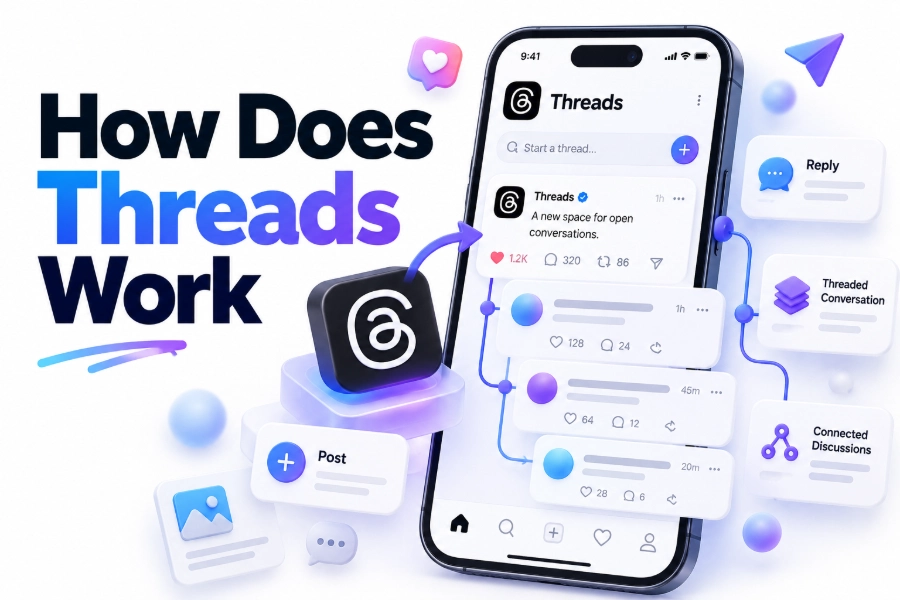
Threads is Meta’s text-based social media platform for sharing short posts, joining public conversations, and following people around topics such as technology, sports, entertainment, business, news, and everyday life. It is connected to Instagram, but it works as a separate app with its own feed, profiles, interactions, and content recommendations.
To understand how does threads work, think of it as a conversation-focused network rather than a photo-first platform. You can publish text, images, videos, links, polls, and replies, then interact through likes, reposts, quotes, and comments. Your feed combines posts from accounts you follow with recommended content from people you do not follow.
This guide explains how Threads is connected to Instagram, how its feeds and algorithm operate, how to create useful posts, how privacy and moderation work, and what the platform can realistically do for personal brands and businesses. It also covers common limitations, practical posting tips, and ways to solve problems new users often encounter.
What Threads Is and How the Platform Works
Threads is a social network built around public text conversations. Meta launched it as a companion platform to Instagram, so many people begin by using their existing Instagram account. Although the two services are connected, Threads has a different purpose: Instagram emphasizes visual profiles and media, while Threads emphasizes opinions, updates, replies, and fast-moving discussions.
The main activity on Threads is publishing a post and responding to other posts. You can write a short update, share a link, upload media, ask a question, or add your perspective to an existing conversation. Other users can reply, like, repost, quote, or share your post elsewhere.
Your Threads profile includes a username, profile photo, biography, links, and posts. Your Instagram username is generally carried over when you create the account, which makes it easier for existing followers to recognize you. You can edit your Threads profile separately and decide whether the account should be public or private.
The platform is designed for open discovery. A post can appear in the feeds of people who do not follow you if the system believes the subject or conversation may interest them. This gives useful posts a chance to travel beyond an account’s existing audience.
The Connection Between Threads and Instagram
Threads uses Instagram for account creation and identity connection, but the services are not identical. You may use the same login details and carry over parts of your profile, yet your Threads activity remains separate from your Instagram posts, Stories, Reels, and direct messages.
When you join Threads, the app may suggest Instagram accounts to follow. You can follow some or all of them, or start with a smaller group. Your Threads follower list can become different from your Instagram follower list as you interact with new people and communities.
The connection is useful for trust and convenience, but it also means your activity may be visible to people who already know you on Instagram. Before posting, check your profile settings and review who can mention, reply to, or interact with your content.
Key differences between the two platforms include:
- Instagram is primarily visual, while Threads is primarily conversational.
- Instagram uses posts, Stories, Reels, and messages as its main formats; Threads centers on posts, replies, reposts, and quotes.
- Threads can recommend your writing to people outside your follower list.
- A Threads post can be shared to an Instagram Story or other platforms.
- The best Instagram caption may not be the best Threads post because Threads rewards discussion and timely opinions.
Creating an Account and Setting Up Your Profile
Getting started usually involves downloading the Threads app or visiting the web version, signing in through Instagram, and choosing your profile settings. During setup, you can import basic profile information, select accounts to follow, and decide whether the account will be public or private.
A clear profile helps people decide whether to follow you. Use a recognizable photo, explain what you discuss, and add a link if you have a website, newsletter, portfolio, or business page. Avoid filling the biography with broad claims. A specific description gives visitors a reason to stay.
For example, “Freelance food writer sharing affordable recipes and restaurant reviews” communicates more than “Food lover and content creator.” The first version sets expectations and helps the right audience understand what they will see in your feed.
After setup, review the account controls. Check who can reply to your posts, who can mention you, whether hidden words should be filtered, and whether your account is public. These settings matter because public conversations can attract replies from people you do not know.
How Posts, Replies, Reposts, and Quotes Work
A regular post is the basic publishing unit on Threads. You can use it to share an idea, announcement, observation, link, image, video, or question. A good post gives readers enough context to understand the point without forcing them to guess what you mean.
Replies appear under another person’s post and are the main way conversations develop. A reply can add an example, provide a useful correction, ask a focused follow-up, or introduce a different viewpoint. Strong replies often attract profile visits because they show how you think.
A repost shares another user’s post with your followers without adding your own commentary. It is useful when the original message already communicates exactly what you want to share. A quote post includes the original post along with your added text, making it better for analysis, agreement, disagreement, or context.
Likes signal appreciation and help organize content you may want to revisit. Depending on the current platform settings, you may also be able to save posts for later. Links, media, polls, and text attachments can give a post more depth when the subject requires additional information.
Practical Posting Workflow
1. Choose one clear idea. Avoid combining an announcement, unrelated opinion, and several questions in one post.
2. Write the most important point first. Readers should understand the subject from the opening sentence.
3. Add context or an example. A specific detail is usually more useful than a broad statement.
4. Invite relevant discussion when appropriate. Ask a focused question rather than adding a generic request for comments.
5. Check names, links, and facts before publishing. Public mistakes can spread quickly through reposts.
6. Respond to useful replies. Follow-up conversation often creates more value than the original post alone.
How the Threads Feed Works
Threads generally uses more than one way to view content. The “For You” experience mixes posts from accounts you follow with recommended posts, while a following-focused feed emphasizes people you have chosen to follow. The exact layout and available feed controls can change as Meta updates the service.
Recommendations are influenced by signals such as the accounts you follow, posts you like, replies you read or write, topics you engage with, and conversations that are receiving attention. The system may also use the text and media in a post to predict whether it matches your interests.
A post does not need to come from a large account to receive distribution. Useful, timely, or conversation-worthy content can be shown to people outside the author’s existing audience. That does not guarantee reach, though. Competition, timing, topic relevance, audience behavior, and moderation systems all affect visibility.
Custom feeds can help organize posts around a subject, group of accounts, or interest. For example, you might create a feed for independent publishing, football news, local restaurants, or software development. A custom feed is especially useful when the general feed becomes too broad.
Ways to Improve the Feed
You can shape recommendations through normal use rather than relying only on account settings.
- Follow accounts that consistently publish subjects you care about.
- Unfollow accounts that repeatedly make your feed irrelevant.
- Use mute when you want to stop seeing someone’s posts without unfollowing them.
- Mark unwanted recommendations as irrelevant when that option is available.
- Use topic tags and custom feeds to find more focused conversations.
- Spend time reading and replying to useful posts instead of interacting randomly.
The Role of Topics and Search
Topics help group conversations around shared interests. A topic may relate to a sport, profession, hobby, event, entertainment category, or current discussion. Adding a relevant topic can help readers find a post, but using a topic that does not match the content can make the post look forced or misleading.
Search allows users to find people, posts, and subjects. Search behavior is different from browsing a general feed because someone searching for a topic already has a specific interest. This creates an opportunity for businesses, experts, and creators to publish clear posts that answer real questions.
Use natural wording in the body of a post. If you are discussing home espresso, for example, mention the specific machine, brewing method, or problem instead of adding a string of unrelated tags. Specific language helps people understand the content and improves the chance that the post reaches an interested audience.
How to Write Posts That Earn Useful Engagement
Engagement on Threads is not limited to likes. A post may perform well because it receives thoughtful replies, reposts, quotes, profile visits, or link clicks. The strongest content usually gives people something concrete to react to.
A personal observation can work when it includes a lesson. A business update can work when it explains why the change matters. A question can work when it is narrow enough to answer. A link can work when you summarize the useful point rather than posting the URL without context.
Try formats such as:
- A short opinion followed by the reason behind it.
- A practical tip with a specific example.
- A before-and-after explanation.
- A myth followed by a correction.
- A question that asks for experience from a defined group.
- A brief list of mistakes people commonly make.
Avoid posting only promotional messages. People may follow a business for expertise, but they rarely want every post to read like an advertisement. Share useful observations, answer questions, explain decisions, and mention products or services when they genuinely fit the conversation.
Threads for Businesses, Creators, and Professionals
Threads can help a business build familiarity through regular public conversation. It is particularly useful for founders, consultants, writers, educators, publishers, local brands, and companies with a recognizable point of view.
A business account can use Threads to announce updates, explain products, answer customer questions, share industry commentary, and show the people behind the organization. The informal format makes it easier to communicate quickly than through a polished website announcement.
Creators can use the platform to test ideas before turning them into videos, newsletters, articles, or longer posts. A short question may reveal what an audience wants explained in more detail. Replies can also highlight objections and misunderstandings that deserve a future piece of content.
Useful business content includes:
- Brief explanations of common customer problems.
- Lessons from recent projects.
- Answers to recurring support questions.
- Commentary on relevant industry changes.
- Behind-the-scenes decisions with practical context.
- Links to helpful resources with a clear reason to click.
Insights and Performance Measurement
Threads provides performance information for eligible accounts and continues to expand its creator and business tools. Available metrics may include views, replies, reposts, quotes, likes, and information about how people found a post. Features can vary by account, region, and app version.
Do not judge a strategy from one post. Review several weeks of activity and compare topics, formats, posting times, and response quality. A post with fewer likes may still be valuable if it generated profile visits, qualified conversations, or clicks from the right audience.
Track patterns rather than chasing a single viral result. If practical posts consistently earn replies, create more practical posts. If links receive little attention but short explanations perform well, put the main value in the Threads post and use the link as supporting material.
Privacy, Safety, and Conversation Controls
Threads includes controls for blocking, restricting, muting, reporting, and filtering interactions. You can manage who may reply or mention you, and some posts may offer more specific reply or quote controls. These options help reduce unwanted attention and keep discussions focused.
A public post can be copied, quoted, screenshotted, or shared outside the platform. Avoid publishing private information, confidential work details, personal contact information, or material you would not want connected to your name later.
When a conversation becomes abusive, do not feel obligated to answer. Use the available controls, report content that violates the rules, and block accounts when necessary. A large follower count does not make every interaction worth your time.
Common Problems New Users Encounter
One common problem is an irrelevant feed. This usually happens when a new account follows too many people at once or interacts with content simply because it is popular. Start with a smaller group of accounts and actively shape recommendations through follows, mutes, and relevant replies.
Another issue is low reach. A new account may need time to establish topics and audience signals. Posting once and expecting immediate distribution is rarely realistic. Make several useful contributions, use specific language, and participate in conversations where your expertise is relevant.
Some users also confuse reposts with quote posts. A repost passes along the original message, while a quote post adds your own commentary. If your viewpoint matters, explain it in the quote rather than assuming readers will understand why you shared the original.
Quick troubleshooting checklist:
- Update the app if a feature is missing.
- Confirm that your account is connected correctly.
- Check privacy and reply settings before assuming a post is hidden.
- Review whether a link or media file meets the platform’s limits.
- Look for muted words, hidden replies, or blocked accounts affecting what you see.
- Give feed changes time to take effect after adjusting your activity.
Threads and the Fediverse
Threads has been working toward greater interoperability with the fediverse, a network of independently operated social platforms that can communicate through compatible technology. Availability and functionality depend on location, account eligibility, settings, and the other service involved.
Fediverse participation can affect how posts, replies, likes, or followers appear across platforms. A person using another compatible service may be able to view or interact with certain Threads content, but the experience may not be identical to an interaction inside Threads.
Treat fediverse features as an additional distribution and conversation option, not as a guarantee that every post will travel everywhere. Review the settings carefully if you prefer to keep your content within Threads or want more control over cross-platform interactions.
Threads Compared With Other Social Platforms
Threads is closest to other text-first networks, but its connection to Instagram gives it a different starting point. Users can bring over familiar identity signals while building a separate conversation history. This makes it easier for Instagram users to start, although success still depends on the quality of their posts.
Compared with Instagram, Threads requires less visual production and rewards written opinions, replies, and timely commentary. Compared with a private messaging app, Threads is much more public and discovery-oriented. Compared with a traditional blog, it is faster to publish but offers less control over layout, ownership, and long-term search visibility.
Choose Threads when you want to participate in ongoing public discussions, test ideas quickly, or build visibility through conversation. A website or newsletter remains more suitable for detailed evergreen content that you fully control. Many creators use both: Threads for discovery and discussion, and owned channels for deeper resources.
Common Mistakes to Avoid
The biggest mistake is treating Threads as a place to copy every Instagram caption. A caption written for a photo may lack a clear idea when posted without the image. Adapt the message so it works as a standalone thought.
Posting too frequently without adding value can also reduce interest. More posts do not automatically create more reach. A smaller number of useful, well-timed contributions is often easier for readers to remember.
Other mistakes include:
- Using vague statements that give readers nothing specific to discuss.
- Arguing with every critical reply.
- Sharing links without explaining what readers will gain.
- Chasing trends unrelated to your subject.
- Ignoring replies from people asking genuine questions.
- Revealing private information during an emotional moment.
- Measuring success only by follower count.
A Practical Weekly Content Plan
A simple schedule can make Threads easier to maintain. On one day, publish a practical tip. On another, respond to a common question in your field. Later in the week, share an observation, invite discussion, and link to a deeper resource when it genuinely adds value.
Keep a small list of recurring subjects, customer questions, useful examples, and opinions you want to develop. This prevents the pressure to invent a completely new idea every time you open the app.
For deeper guidance on planning related content, add [Internal Link: Social Media Content Strategy] naturally within your broader content system. If you publish articles or resources elsewhere, Threads can help introduce those ideas to people who may not find them through search alone.
Conclusion
Threads is a public conversation platform connected to Instagram, but it has its own purpose and behavior. Users create a profile, follow accounts, publish text and media, reply to discussions, and receive a mixture of followed and recommended content. The feed responds to the topics and interactions that appear most relevant to each person.
The most effective approach is straightforward: write about a clear subject, provide useful context, participate in relevant conversations, and adjust your feed as you learn what interests you. Use topics, custom feeds, reply controls, and privacy settings to make the platform more manageable.
Threads works best when treated as an ongoing exchange rather than a billboard for announcements. Businesses can use it for expertise and customer communication, while creators can test ideas and build relationships through replies. For anyone asking how does threads work, the practical answer is that visibility comes from useful posts and meaningful participation, supported by an algorithm that recommends conversations beyond your immediate followers.
Frequently Asked Questions
What is Threads used for?
Threads is used for sharing text-based updates, joining public discussions, posting images and videos, asking questions, and following topics or people. It is especially suited to quick opinions, industry commentary, announcements, and conversational content.
Do you need Instagram to use Threads?
Threads is closely connected to Instagram, and account creation commonly uses Instagram login details. Your profiles remain separate after setup, but your Instagram identity can help you find accounts and build an initial network.
How does the Threads algorithm choose posts?
The feed uses signals such as accounts followed, posts viewed, likes, replies, topics, and other interactions. It combines followed content with recommendations, so relevant posts may reach people who do not follow the author.
Can you make a Threads account private?
Yes, Threads supports private account settings. A private profile gives you more control over who follows and interacts with you, although you should still avoid posting information that needs complete confidentiality.
Is Threads free to use?
Threads is generally free to download and use. The platform may change its features, advertising model, or account options over time, but ordinary users can create profiles and participate without a standard subscription requirement.